
GenMail
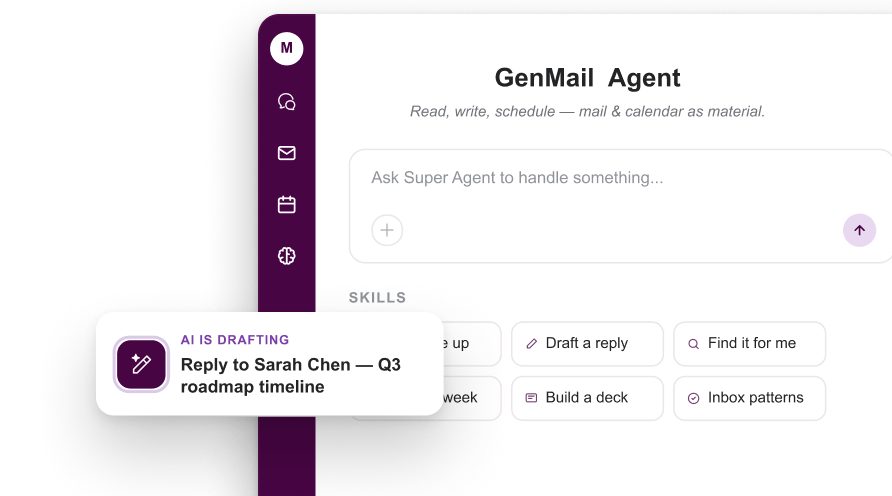
What is GenMail?
TL;DRGenMail is an AI email tool from Genspark designed to help users draft, rewrite, summarize, and manage email communication with less manual work. It is aimed at teams and builders who want practical, repeatable workflows with AI.
- Unifies Gmail and Outlook accounts in one inbox
- Builds an Email Brain to learn writing style, priorities, and key relationships
- Drafts replies, summarizes emails, extracts action items, and supports natural language search
Explore with AI


About
GenMail is Genspark's AI-powered email and calendar client for getting through email faster. It brings Gmail and Outlook accounts into one unified inbox, then adds an AI layer that can triage messages, summarize threads, draft replies, extract action items, and help with calendar work directly from the inbox.
The product is built around what Genspark calls an Email Brain, a private profile learned from a user's email history. That profile helps GenMail understand writing style, important contacts, work patterns, and communication preferences, so drafts can sound closer to the user and important messages can be prioritized more intelligently.
GenMail also includes a built-in calendar and agent-style actions. Users can see their day, book meetings, send invites, prepare for meetings, research people or companies, turn threads into briefs, and ask the inbox assistant to summarize or draft without switching apps. It is available across desktop and mobile platforms, including Mac, Windows, iPhone, and Android.
The main value is speed for people who live in email. Instead of only being another mail client, GenMail tries to become a decision layer for the inbox. The tradeoff is trust and privacy sensitivity: users need to connect important email accounts, so teams should review data handling, account permissions, and beta maturity before using it for critical business communication.
Use Cases
Email Drafting
Generate polished email drafts from short instructions, notes, or intended outcomes.
Email Rewriting
Rewrite messages for clearer wording, stronger tone, or more professional communication.
Inbox Assistance
Use AI to reduce repetitive email work and speed up common communication tasks.
Message Summaries
Condense longer email content into useful takeaways so users can process communication faster.
Key Features
- Unifies Gmail and Outlook accounts in one inbox
- Builds an Email Brain to learn writing style, priorities, and key relationships
- Drafts replies, summarizes emails, extracts action items, and supports natural language search
- Combines email, calendar, meeting prep, scheduling, and agent actions in one client
We may earn commissions from links to support our work. Learn more.
Explore with AI
Pricing summary
GenMail is currently listed as free during beta on its official page. Broader Genspark membership plans include Plus at $24.99/month or $239.99/year and Pro at $249.99/month or $2,399.99/year.
Pricing & Plans
Popular
Free Beta
Use GenMail during beta across supported platforms.
Free
- Free during beta
- Gmail and Outlook unified inbox
- AI compose, reply, summary, triage, and search
- Available on Mac, Windows, iPhone, and Android
Genspark Plus
Genspark membership plan for broader AI workspace usage.
$24.99/month
- 10,000 credits per month
- Access to broader Genspark AI workspace tools
- 50 GB AI Drive storage
- Commercial license for AI-generated content
Genspark Pro
Higher-credit membership for power users and heavier workflows.
$249.99/month
- 125,000 credits per month
- 12x the credit allowance of Plus
- 1 TB AI Drive storage
- Early access to beta features
Other pricing notes
- Free during beta; pricing may change later or be bundled with Genspark plans.
- Requires connecting email accounts, and the Android listing says it requires a Genspark account.
Pricing last checked: July 2026Official pricing
Pros & Cons
Pros
- Combines Gmail and Outlook into one AI-powered inbox
- Drafts replies in the user's writing style using an Email Brain profile
- Supports AI summaries, smart triage, action items, meeting prep, and calendar workflows
- Works across desktop and mobile platforms including Mac, Windows, iPhone, and Android
- Useful for busy founders, operators, sales teams, and anyone overloaded by email
Cons
- Requires connecting sensitive email accounts, so privacy and permissions need careful review
- Beta pricing and availability may change as the product matures
- Users who already have a strict email workflow may need time to trust AI triage and drafts
- Deepest value likely depends on having enough email history for personalization
- Not ideal for users who only need a simple lightweight mail client without AI features
The Best GenMail Alternatives
The best GenMail alternatives are Superhuman, Notion AI, and ChatGPT.



Frequently Asked Questions
Reviews
Honest feedback from the FutureStack community.
0.00 ratings
No reviews yet. Be the first to share your experience.
Trending Tools on FutureStack
Discover the most popular and hand-picked AI tools across FutureStack










GenMail
Productivity